

🎧 Listen to this article as a podcast on Spotify
An illustrative count, not a customer case.
A fee explanation needs one sentence changed. Compliance agrees the new wording before lunch.
Then someone asks where the sentence appears.
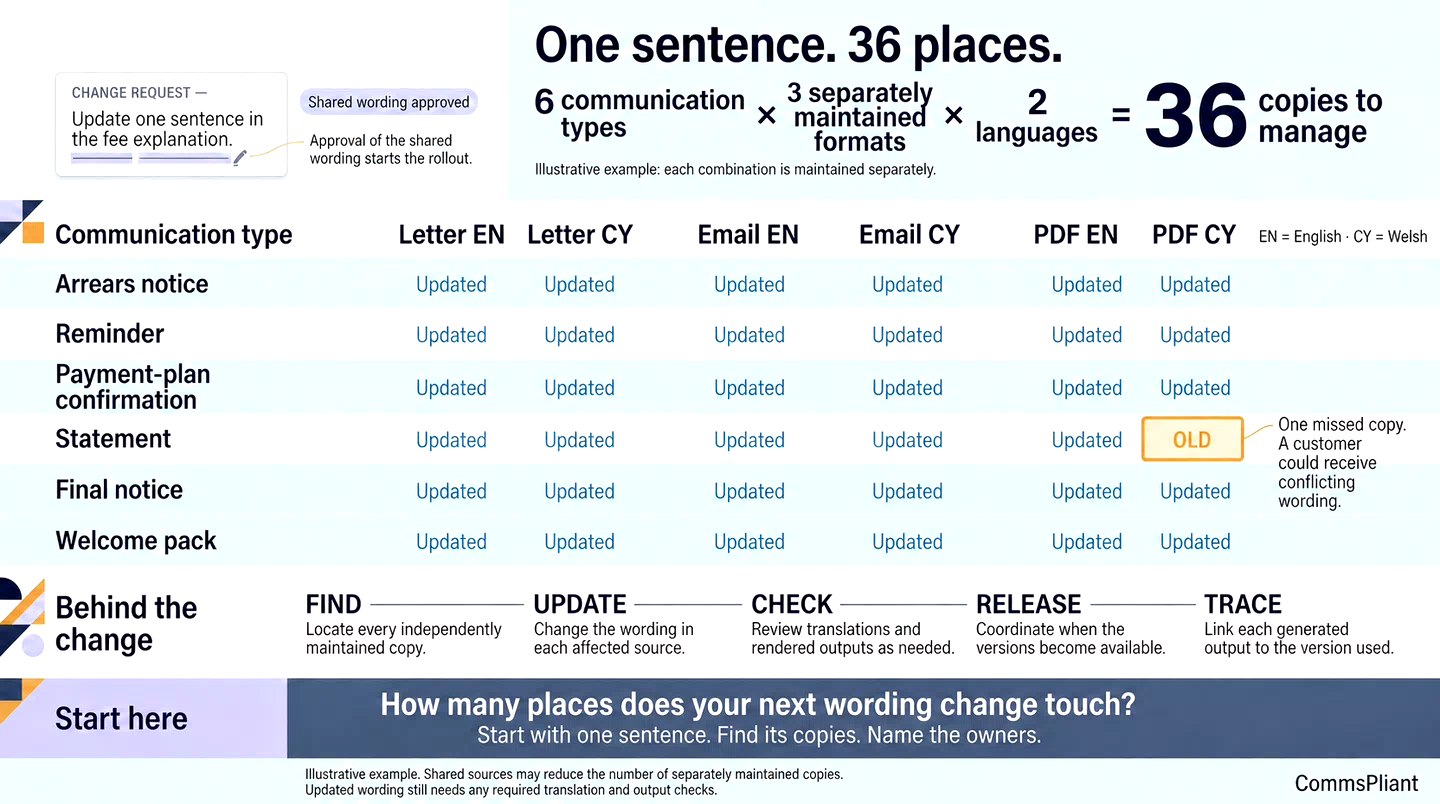
It is used in six communication types: an arrears notice, a reminder, a payment-plan confirmation, a statement, a final notice and a welcome pack. In this example, each has three separately maintained formats — printed letter, email body and PDF — in English and Welsh.
6 communication types × 3 separately maintained formats × 2 languages = 36 places.
That number is only true where each combination is kept as a separate copy. A PDF might also be the source of a printed letter, rather than another independently maintained version. Your count will be different, and it may be lower.
The point is that nobody knows the number until they count.
The short answer: the sentence is small. The work is in finding every copy, changing it, reviewing it, coordinating release and later establishing which version was used for each customer.
Count where one sentence lives
Pick one sentence your team changed in the last quarter. Then list every place it appears:
Communication types: every notice, reminder, confirmation or other message that repeats it.
Formats and channels: which versions keep their own copy of the wording, and which draw from a shared source.
Languages and variants: translations, large-print versions, product or brand variants.
Owners: who can change each copy, and in which system.
Outside your systems: copies held by a print supplier, a collections partner or a software vendor.
The last group can be the one that surprises people, because those copies change on someone else’s timetable.
Count independently maintained copies, rather than counting the same source again every time it is used.
Where the time goes
Once the copies are counted, the delay becomes easier to explain.
Finding the copies. Someone has to search folders, systems and code for every occurrence of the sentence.
Engineering work. Where wording sits inside application code, a sentence change can become a ticket, a test and a deployment. We looked at this step in When a Wording Change Should Not Wait for a Software Release.
Review, more than once. The shared wording may be agreed, but translations and individual outputs still need appropriate checks. A sentence that works in one layout may create an awkward page break or separate an instruction from its explanation in another.
Release timing. Separately maintained versions may go live at different times. During that gap, an email and its PDF attachment could contain different wording.
Evidence later. When a customer queries a communication, someone has to establish which version was used and what the customer-specific output contained.
None of these steps is unreasonable on its own. Across many copies, the work and waiting time can turn a one-line edit into a much longer change.
When copies drift
The risk is not only delay.
If one copy is missed, a customer may receive an email with the new wording and a PDF with the old. Each may have passed its own approval process, yet the two messages no longer agree.
The customer may be the first to notice.
Drift also makes later questions harder. If someone asks what the customer was told, the answer depends on which version was used, on which day, and what appeared in the actual communication.
Keeping the copies in step
You may not be able to remove every copy, and some should stay separate for good reasons. What helps is knowing which ones exist and managing them as one coordinated change:
Keep a single approved source for shared wording wherever your systems allow.
List the versions that must remain separate, such as translations or supplier-held templates, and identify who updates each one.
Approve the shared wording, then complete any necessary checks of translations and rendered versions.
Agree when each affected version will become available for use. If simultaneous release is not possible, identify the gaps and how the team will manage them.
Record which template version generated each output, and connect that record to the retained communication and sending records where applicable.
A shared source can reduce repeated editing. It does not remove the need to check how the wording works in each relevant context.
Where CommsPliant fits
In CommsPliant, business teams update wording in one controlled workspace, and a separate authorised user approves it.
Connected systems request a communication by its template identifier, and CommsPliant generates it from the latest approved version available for that template.
Once the integration is in place, routine wording changes within its scope do not need a software release. New data mappings or routing logic may still need engineering work.
Separately maintained templates, translations and supplier-held copies still need to be identified and managed. A controlled workspace supports that process; it does not automatically update copies outside its scope.
Next step
Pick the sentence you changed most recently and count where it lives.
Write the number down, along with the copies you could not find on the first try and the person responsible for each one.
That list gives you a clearer picture of the work behind your next wording change.