
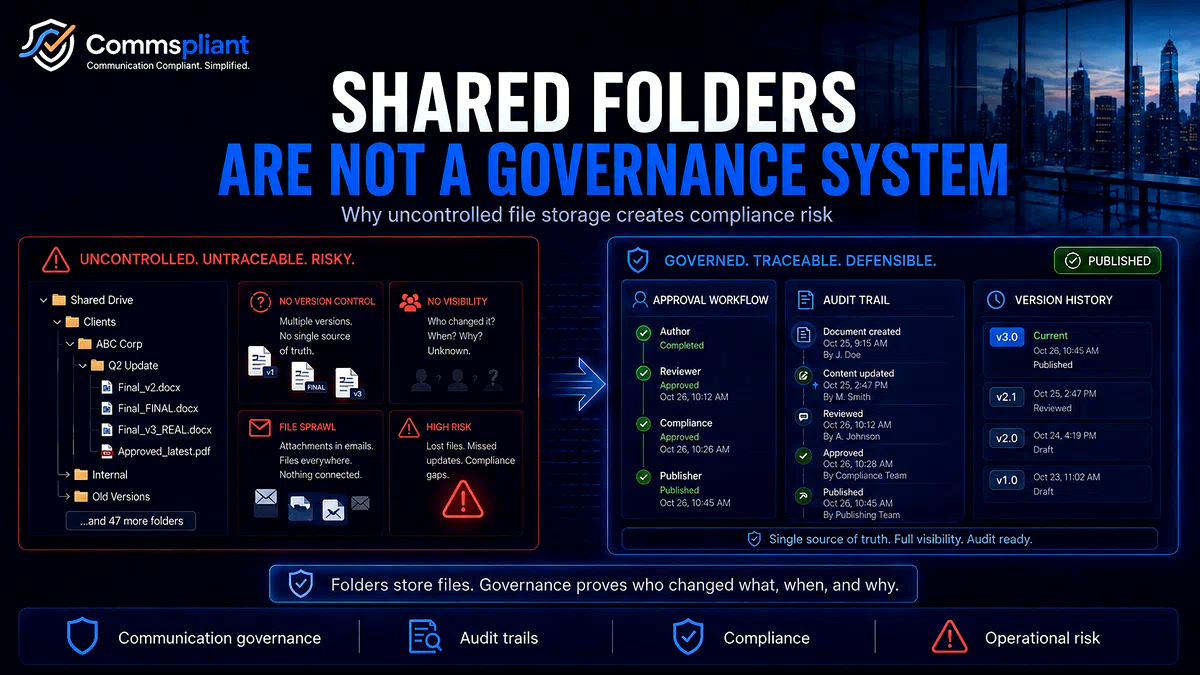

When a regulated business is small, managing customer-facing communication templates in a shared folder can feel practical.
A master PDF statement, a welcome letter, a policy notice or a list of approved wording is saved into Google Drive, SharePoint, OneDrive or another shared workspace. Teams are given access. Files are organised into folders. Everyone knows where to look.
At first, this can work.
But as the business grows, the communication process becomes more complex.
More teams are involved. More versions appear. More approvals are needed. More customer journeys depend on the correct wording being used at the right time.
Shared folders are useful for general collaboration and document storage.
But they are not designed to manage the full approval, publication, version history and audit lifecycle of regulated customer communications.
That is where the governance gap begins.
The Illusion of Folder Control
A common assumption is that because a shared folder shows who last modified a file, it provides enough history.
But when an internal review, customer complaint or audit question arises, the business may need to answer more detailed questions:
Who approved this wording change?
When did the approved version go live?
Is the file in the folder the same version that was approved?
Are older versions clearly retired?
Can a team member accidentally edit, rename or move a live template?
Does the file history explain why a paragraph changed, or only that something changed?
A shared folder can show activity.
It does not always show the full business process behind the activity.
Why Shared Folders Create Communication Gaps
Shared folders are built for collaboration. That is their strength.
But customer communication governance requires more than collaboration. It requires controlled workflows, clear approval status, traceable version history and confidence about what is live.
Several problems can appear over time.
The accidental overwrite problem
A team member may open a master template to check wording, fix a small layout issue or make a quick edit.
If the file is saved in the wrong place, or if permissions are too broad, the master version may change without the right review or approval.
The risk is not bad intent.
The risk is an everyday human mistake.
The file naming problem
Without structured version control, teams often create their own naming systems.
A folder can quickly fill with files such as:
Welcome_Letter_v2
Welcome_Letter_FINAL
Welcome_Letter_FINAL_APPROVED
Welcome_Letter_new_version
Welcome_Letter_use_this_one
Over time, the business may lose confidence about which file is current, approved, retired or live.
The missing approval trail problem
A shared drive may show that a file was modified by a user at a certain time.
But it may not clearly connect that edit to the approval process.
Who reviewed the wording?
Who approved it?
Was it approved before or after the file was changed?
Was the approved version the same version that went live?
If those answers live in email chains, meeting notes or separate tickets, the governance trail becomes fragmented.
The broken template connection problem
Some teams connect automated processes to files or templates stored in shared folders.
If someone moves a file, changes a filename, edits a variable tag or replaces a template, the downstream process can be affected.
That can lead to broken outputs, wrong templates or manual fixes.
The shared folder may look tidy to a human user, but the system depending on it may need stability and controlled structure.
The Cost of Shared Folder Confusion
When shared folder confusion affects customer communications, the cost is rarely limited to one file.
Teams may need to investigate which version was used, when it changed, who approved it and whether customers received the correct communication.
That investigation can involve operations, compliance, product, data and engineering teams.
Instead of having a clear record, the business has to reconstruct the timeline manually.
This is slow, frustrating and avoidable.
What Better Communication Governance Looks Like
Moving away from shared folders does not mean shared folders are bad.
It means they should be used for the right purpose.
Shared folders can still be useful for early drafts, internal notes, project documents and working materials.
But live customer-facing communications need a more controlled environment.
A stronger communication governance process should include:
1. Clear permission control
Users should have access based on their role. Drafting, reviewing, approving and publishing should not all rely on the same level of folder access.
2. Structured approval workflow
Important customer communication changes should move through a defined process before they become live.
3. Controlled version history
Every approved version should have a clear record of what changed, when it changed and who approved it.
4. Clear lifecycle status
Teams should be able to see whether a communication is draft, in review, approved, live or retired.
5. Stable system connection
If customer emails or PDFs are generated automatically, the system should use approved templates from a controlled source rather than depending on fragile filenames or manually managed folders.
Separating Collaboration from Communication Control
The key shift is not removing collaboration.
It is separating collaboration from production control.
Teams can still use shared drives for working documents and internal materials.
But approved customer communications need a governed process that gives compliance, operations, product and engineering teams confidence about what is approved, what is live and what record exists if questions arise later.
That creates a cleaner division of responsibility.
Shared folders support collaboration.
A communication governance system controls the lifecycle.
Where CommsPliant Fits
CommsPliant is a working platform that helps regulated teams manage approved customer emails and PDFs in one controlled workspace, with approval workflows, version history, audit logs and API rendering.
The goal is to reduce reliance on shared folders, manual tracking, developer tickets and scattered approval records when managing customer communication changes.
Instead of asking teams to search across folders, filenames, email chains and tickets, CommsPliant is designed to provide a clearer process for managing approved communication wording from draft to publication.
General Information Notice
This article is for general information only and does not constitute legal, regulatory or compliance advice. Regulated firms should consult qualified compliance or legal professionals when interpreting specific obligations.
Book a discovery call
CommsPliant is a working platform for regulated businesses that manage customer emails, PDFs or letters through fragmented workflows and want a clearer, more auditable way to control communication changes.
If your team is trying to reduce shared folder confusion, manual approvals or version uncertainty in customer communication workflows, book a discovery call or contact us to discuss CommsPliant.