
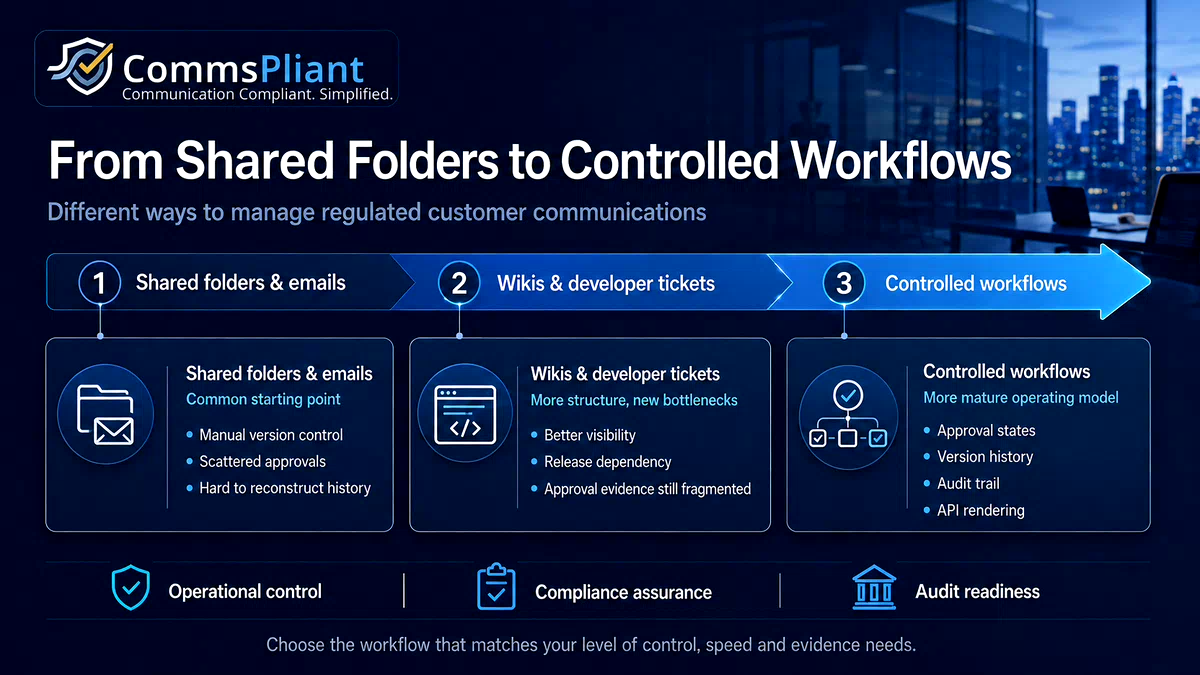

Different Ways to Manage Regulated Customer Communications: From Shared Folders to Controlled Workflows
Every regulated business already has a way of getting customer communications out the door.
No compliance, operations or product team is starting from a complete vacuum. There is always a folder, a template, an inbox, a wiki, a ticketing process, or a long-standing habit that keeps things moving.
The real question is not whether a process exists. It is whether that process was designed to carry the weight now being placed on it: regulatory accuracy, version control, approval evidence, and the ability to update wording quickly when something changes.
Most teams do not choose their communication workflow from a clean sheet. They inherit it. A folder structure someone created years ago. An approval habit that grew out of urgency. A dependency on engineering that became permanent because there was never a better alternative.
That does not mean the team is doing anything wrong. It means the workflow may have grown beyond the tools originally used to support it.
Four Ways Regulated Teams Manage Customer Communications Today
1. Shared folders and email approvals
In many organisations, customer email templates, PDF wording and letter copy live in tools such as Google Drive, SharePoint or Dropbox. Approvals happen informally, often through an email reply, a chat message, or a comment confirming that the wording looks acceptable.
Strengths:
This approach is familiar. It has almost no learning curve because everyone already understands folders, files and inboxes. For small teams with low communication volume, it can feel quick and practical.
Risks and limits:
The weakness is control. Version history often ends up living in the file name rather than in the system: final, final reviewed, final legal edit, final latest.
There is also no single approval record. If someone later needs to prove who approved a specific version, when it was approved, and whether that version was the one actually used, the answer may be scattered across old inboxes, folder histories and individual memory.
Shared folders can store documents. They do not always control the lifecycle of regulated communications.
2. Internal wikis and intranets
Some teams move approved wording into tools such as Confluence, Notion or an internal intranet page. This can create a clearer place for operations teams to find standard wording and reduce the chaos of scattered files.
Strengths:
A wiki or intranet can improve visibility. It is searchable, more centralised than a shared folder, and often easier for teams to browse. It can also help document guidance, context and internal notes around customer communications.
Risks and limits:
These tools are usually built for documentation, not controlled release.
A page being visible is not the same as a page being approved. A page being updated is not the same as a change being formally reviewed. A page having history is not the same as having a clean approval trail connected to the exact version used in a live customer communication.
For regulated customer emails, PDFs and letters, teams often need more than a knowledge base. They need lifecycle control.
3. Developer tickets and hardcoded wording
In many systems, communication wording lives inside the application itself. Email templates, PDF text, letters, labels or disclosure wording may be stored in code, configuration files or developer-managed templates.
When wording needs to change, the business raises a ticket. The ticket joins a backlog, waits for prioritisation, moves through development, gets reviewed, tested and deployed.
Strengths:
This approach can feel secure because business users cannot accidentally change live wording. Engineering controls the release process, and changes follow existing technical governance.
Risks and limits:
The trade-off is speed and ownership.
A small wording change can become a development task. A typo fix, rate update or approved disclosure change may need to wait for a sprint, code review, QA and a deployment window.
This creates a mismatch. Compliance or operations may own the wording risk, but engineering holds the practical ability to change it. Engineers then spend time updating sentences instead of building product capability, while business teams wait for changes that may be operationally urgent.
The issue is not that engineering is doing anything wrong. It is that wording changes and software releases often move at different speeds.
4. Controlled communication workflows
A controlled communication workflow is different from a folder, a wiki or a developer ticket.
It treats customer communication wording as a managed operational asset. Templates move through clear lifecycle states such as draft, review, approved, live and archived. Changes create version history automatically. Approvals happen inside the workflow, not in a separate email thread that has to be reconstructed later.
Strengths:
Business teams can draft and edit wording without risking accidental publication. Compliance or authorised reviewers can act as the final approval gate. Engineering can connect systems once and avoid handling every text change as a development task.
The audit trail becomes a by-product of normal work. The system records what changed, who changed it, who approved it, when it was approved, and which version was live.
Limits:
This approach requires more structure. Teams used to loose documents and informal approvals may need to adjust to clearer roles, clearer states and a more disciplined release process.
For many regulated teams, that structure is exactly the point.
Where Does Your Team Sit?
There is no universally wrong way to manage regulated communications.
A shared folder may be reasonable for an early-stage team with a small number of templates. A wiki may be enough when the main problem is visibility. A developer-managed process may be appropriate where wording is tightly coupled to technical logic.
The useful question is whether the current setup still matches the level of risk, volume and scrutiny attached to the communications being managed.
A few questions can help:
If an auditor or internal reviewer asked for the exact wording a customer received on a specific date, plus proof of who approved it, how long would it take to find?
Could a team member accidentally edit, copy or use an unapproved draft of a customer communication?
How many manual steps sit between a wording edit and that wording going live?
Are approvals captured inside the workflow, or scattered across emails, chats and comments?
Are developers spending time coding text changes that business and compliance teams could otherwise manage directly?
If the answers feel uncomfortable, that does not mean the team has failed. It usually means the process has outgrown the tools around it.
There Is No Wrong Place to Start
Most regulated teams move through several stages over time.
A shared folder becomes a wiki once enough people need access. A wiki becomes a ticketing process once teams want more control. A developer-led process becomes a bottleneck once wording changes become frequent, urgent or compliance-sensitive.
Each stage solves one problem while quietly creating another.
The pattern worth noticing is not which approach a team uses today. It is how much manual reconstruction is required to answer a simple governance question:
Which version was approved, when was it approved, and what went live?
When answering that question depends on searching inboxes, comparing file names, reading ticket comments and asking people what they remember, the workflow may be carrying more risk than it appears.
Where CommsPliant Fits
CommsPliant is a working platform for teams moving toward the fourth approach: a controlled workspace for approved customer emails, PDFs and letters.
CommsPliant lets business teams update wording directly, compliance teams review and approve changes through a structured workflow, and engineering teams connect once through an API rather than handling every wording change as a development task.
The goal is not to suggest that every team needs a controlled workflow immediately. The goal is to make the options clearer, so regulated teams can recognise when their current approach has reached its limits.
CommsPliant is a working platform open to new clients and potential design partners. We are speaking with regulated businesses that manage customer communications through shared folders, wikis, developer tickets or a mix of all three, and want a more controlled way to manage what comes next.
General Information Notice
This article is for general information only and does not constitute legal or regulatory advice. Regulated firms should consult qualified legal or regulatory professionals when interpreting specific obligations.